When the cloudflare proxy is enabled for your domain, you must exclude certain URI paths from the captcha in order the oAuth to work. The URIs include:
"oauth"
"mcp"

Hostware MCP lets an MCP-capable assistant such as Claude work in your installation as your admin user—looking up customers, placing orders, managing hosting and DNS, handling tickets, and more.
Activate the Admin API first, turn on MCP in your admin profile, then connect the assistant with your installation’s MCP URL.
MCP is available only after the Admin API is on, and only for the admin who enables it in their profile.
In Settings > Admin API, activate the Admin API.
Open your admin profile and activate MCP.
On Connected Apps, copy the MCP URL for your installation (path /mcp on the domain of the sales channel you want to use).
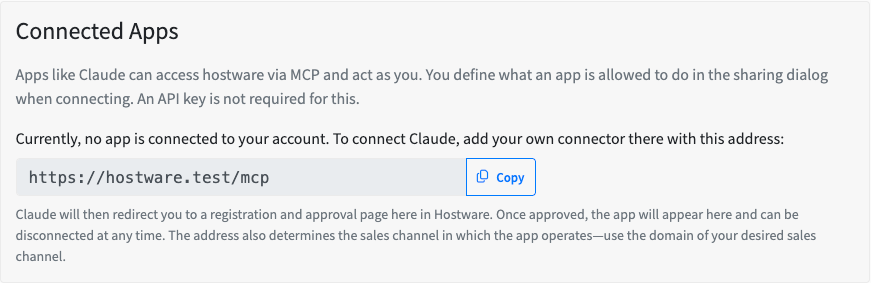
No API key is required. The assistant acts as you; permissions are set in the sharing dialog when you connect. After you approve the app in Hostware, it appears under Connected Apps and can be disconnected at any time. The MCP URL’s domain selects the sales channel.
Add Hostware as a custom connector, then authorize once in Hostware.
In Claude, open Customize → Connectors → Add Connector → Add custom connector.
Enter a name (for example Hostware) and paste your MCP URL.
Connect and complete the Hostware login and approval flow.
Start a new conversation and use the connector.
"oauth"
"mcp"
Ask in plain language. Most actions resolve names (customer, product, period, payment method) instead of IDs; a few items such as ticket priority or admin assignment still need an id.
Customers — look up by name, email, number, or id; browse customer groups
Orders — place a product or domain order (by product/period/payment-method name), auto-approved and invoiced in one step; review existing orders
Billing — list and read invoices, create invoices, finalize/sync a draft to accounting; view payment methods, billing agreements, and payment periods
Contracts — list contracts; book a cancellation (honors the notice period)
Hosting — list and inspect hostings; install, suspend, resume, or terminate
Domains — check availability and TLD suggestions with live pricing; add, edit, or delete DNS records in a zone
Support tickets — open, find, read, reply, reassign, re-prioritize, and close; list statuses, departments, and priorities
Marketing — create and send newsletters (by group/status/product); manage storefront announcements and promotions with coupon codes
Knowledge bases — list knowledge bases and categories; write, update, schedule, and delete articles; upload, replace, or delete images in the media manager
Money-related and irreversible actions require an explicit confirmation before they run. The tools refuse until you confirm. That includes placing an order, creating or syncing an invoice, cancelling a contract, sending a newsletter, deleting an article, replacing or deleting a media file, and deleting a record.
Reversible actions such as suspending or resuming a hosting do not require that extra confirmation.
Find the customer with email [email protected].
Show me all customers in the "premium" group.
What customer groups do we have?
Order the "Webhosting Pro" product for Logan Bruce on the 12-month period, pay by invoice.
Register example.com for customer 899 and bundle it with their hosting product.
List Logan's orders and tell me which ones are still awaiting approval.
Show me all outstanding (open/overdue) invoices for Logan Bruce.
Create a €50 invoice for customer 899 for "one-off setup work" and sync it to the accounting system.
What payment methods and billing agreements does this customer have?
Cancel Logan's "Webhosting Pro" contract at the next possible date.
List all active contracts for customer 899.
When does contract 10014 renew?
Suspend the hosting for example.com.
Re-run the install for hosting 10002 — it's stuck in an error state.
Show me all hostings in INSTALLATION_ERROR.
Is example.de available, and what would it cost?
Suggest alternative TLDs for "mycoolstartup".
Point the www A-record for example.com to 203.0.113.20.
Open a high-priority ticket for Logan about a billing discrepancy and assign it to me.
Find the ticket about the timeout error and reply that we've deployed a fix, then close it.
List all open tickets.
Create a newsletter for all active customers announcing our new datacenter and send it.
Put up a warning announcement about scheduled maintenance this weekend.
Create a 10%-off promotion for the "Webhosting Pro" product with 50 coupon codes.