
Ticket closing email and customer feedback
When a ticket is closed, hostware can send the customer a closing email and ask for feedback in the same email. You turn both on per department. The customer's feedback then shows up directly in the ticket, and you can get an admin notification whenever new feedback arrives.
Turn on the closing email and feedback
Both options are off by default, including after an update. Until you turn them on, closing a ticket works as before and the customer receives no email.
Go to Support → Abteilungen (Departments) and edit the department.
Enable Schließungs-E-Mail an Kunden senden? (send closing email to customer).
Optional: Enable Um Feedback bitten? (ask for feedback).
Click Abteilung bearbeiten (save department).
Asking for feedback only works while the closing email is enabled. The feedback question is part of the closing email, so the customer gets exactly one email per closed ticket.
When the closing email is sent
The department setting applies to every way a ticket can be closed:
in the admin area
by the customer in the customer portal
through the API
by the sync with an external ticket provider
by automatic closing (Automatische Schließung nach Tage(n) in the department)
When you close a ticket in the admin area, you can skip the email for that one ticket. Uncheck Schließungs-E-Mail an Kunden senden? while closing it. The department setting stays as it is.
Guest tickets without a customer account get the closing email without the feedback question. The feedback form lives in the customer portal and requires a login.
How the customer gives feedback
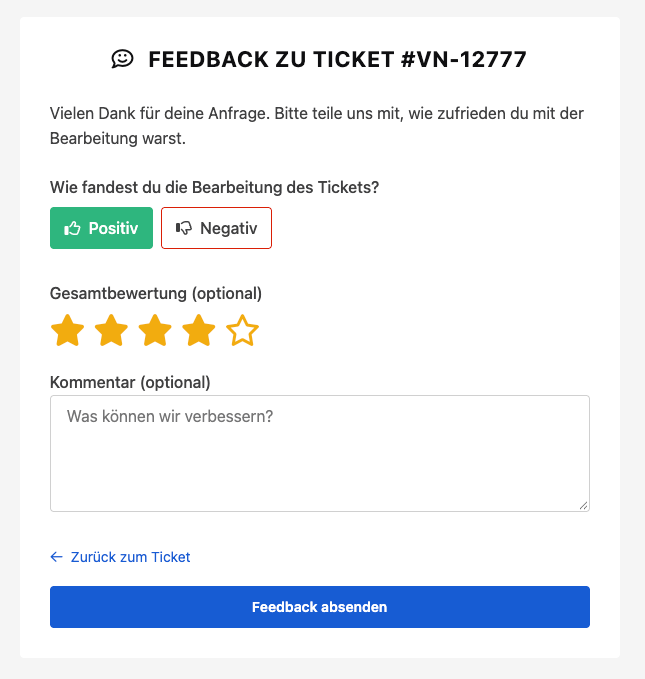
With feedback enabled, the closing email asks whether the issue was resolved and shows two buttons: resolved and not resolved. Either button opens the feedback form in the customer portal with that answer already selected.
The customer rates the handling of the ticket as positive or negative.
Optional: They give an overall rating of 1 to 5 stars.
Optional: They add a comment.
They click Send feedback.
Only the positive or negative rating is required. Customers can give feedback once per ticket. Until they do, every closed ticket in the customer portal shows a Give feedback button, even without the email. Open tickets don't accept feedback.
See the feedback in the ticket
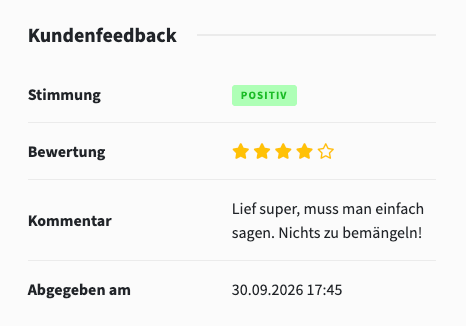
Once a ticket is closed, the ticket detail page shows a Kundenfeedback (customer feedback) section in the right column. It lists the positive or negative rating, the stars, the comment and when the feedback was submitted. Without feedback, the section says that none has been given yet.
Get notified about new feedback
For every submitted feedback, hostware sends the admin notification Neues Ticket-Feedback eingegangen (new ticket feedback) with the customer, ticket subject, rating, comment and a link to the ticket. On existing notification channels this event is already enabled after the update. You can turn it off per channel.
By email, the notification goes to the admin assigned to the ticket. If nobody is assigned, it goes to the admins restricted to the ticket's department. If there are none, it goes to the email addresses of the channel.
Change the text of the closing email
Edit the text under Einstellungen → E-Mail Vorlagen (Settings → Email templates) in the template closed of the group Ticket (see Email templates). The feedback part sits inside an @if($requestFeedback) block and only appears when the department asks for feedback. The variable $feedbackUrl holds the link to the feedback form.
A test email from the template editor never shows the feedback buttons. To check them, close a test ticket in a department with feedback enabled.