
Minimum invoice amount
The minimum invoice amount setting prevents a customer from being invoiced until their due charges reach a minimum amount you define. If the minimum is not reached, the invoice is held back until the customer's charges reach it or until the maximum waiting time you set has passed — whichever comes first. This avoids low-value invoices whose transaction fees and administrative effort are disproportionate to the invoice amount.
Configuration
The setting is configured per sales channel under Settings > General settings > Invoices. It is off by default.
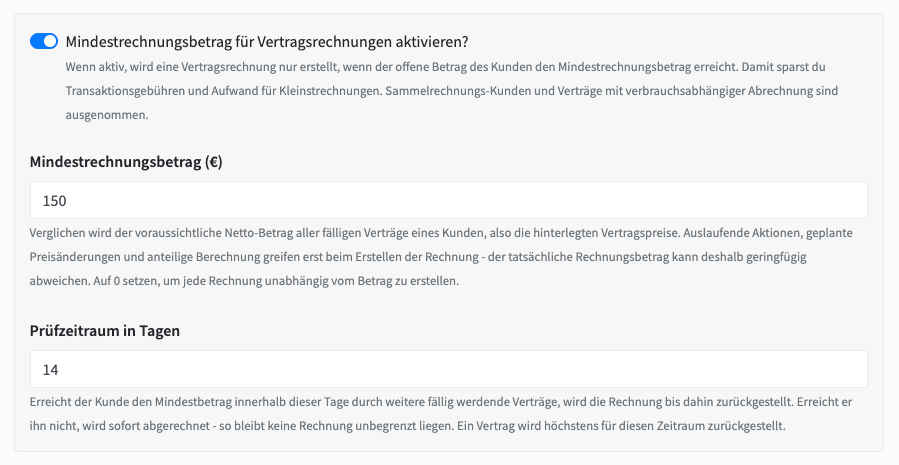
Enable minimum invoice amount — the master switch for the feature.
Minimum invoice amount (€) — the amount a customer's due charges must reach before they are invoiced. The value 0 disables the check.
Check period in days — how long a contract may be held back at most before it is invoiced anyway. Default 30 days, range 0–365.
How it works
Once enabled, a customer is not invoiced until one of two things happens: their due charges reach the minimum amount, or the maximum waiting time you set has passed. When the minimum is reached, the invoice is created as usual. When the waiting time runs out, the invoice is created regardless of the amount, so nothing is delayed indefinitely.
Exemptions
The check never applies to the following:
Collective-invoice customers (see Collective invoices) — their positions are booked as transactions and settled separately.
Contracts with usage-based billing — the final amount is only known after usage is calculated.
Sales channels with invoicing disabled, and contracts the invoice run skips anyway (cancelled, invoice limit reached, ends after trial, not active).
Contracts marked as separate invoice are evaluated on their own, since no other contract can ever join their invoice.
Where you can see it
Every decision is surfaced in the admin area, so it is always clear why a contract has not been invoiced yet.
Contract detail page — a warning banner while the contract is held back, showing the due amount, the minimum, the date the wait started, and the expected billing date.
Contract list — a Held back until … badge in the billing column.
Customer > Invoices tab — a notice listing that customer's held-back contracts with amounts and expected dates.
Invoice overview — a notice listing all held-back contracts of the current sales channel, so a missing invoice is never a mystery.
Contract log — an entry when a contract is held back and another when it is released for invoicing, stating whether the minimum was reached or the maximum wait expired.