
In the dunning levels settings, uncheck Dunning level active?.
Mahnwesen
Dunning stages (Mahnstufen) define what Hostware does with unpaid invoices—and when. Configure them under Settings → Dunning Levels before reminders, fees, letters, or Inkasso transfers run.
On the related Invoices list, overdue invoices appear in red. Sent reminder emails show on the invoice under the Fälligkeit tab.
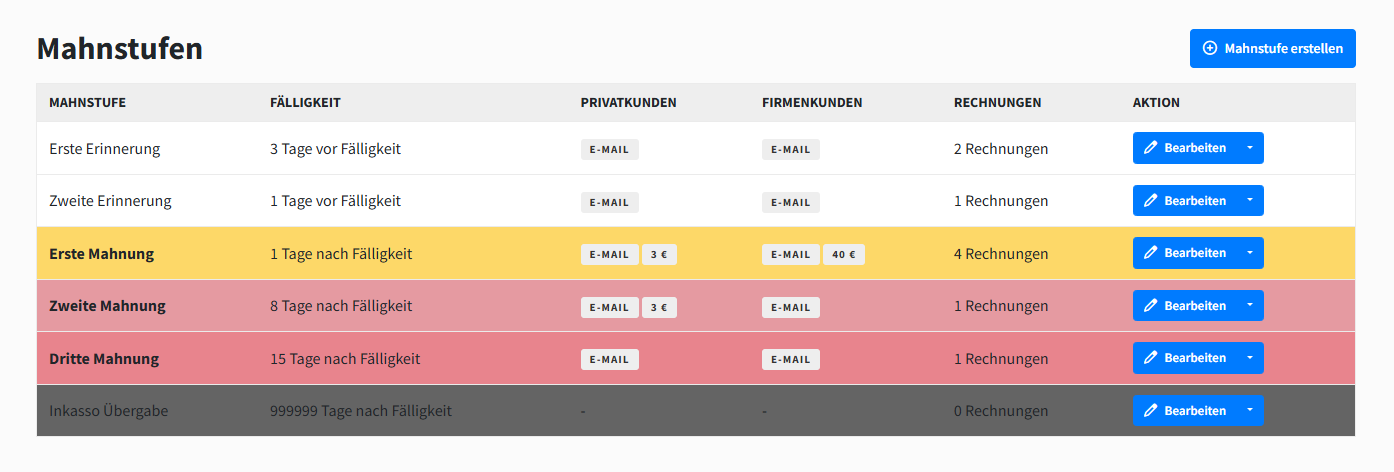
Configure a dunning level
You choose how many levels you need and what each one does. Each level has general display settings, a trigger, and separate dunning details for private and corporate customers.
General information
Set the level name, optional color, and text thickness. These only control how the level looks in the admin and customer areas.

Trigger
Set when the level runs relative to the invoice due date—before or after. You can also temporarily deactivate a level without deleting it.

Dunning details
Configure actions separately for private (B2C) and corporate (B2B) customers. A level can apply to B2B only, B2C only, or both.
Mahngebühr
Add a percentage-based or fixed reminder fee on top of the open amount. The original invoice PDF stays unchanged; the fee is payable in addition.
Reminder fees are not freely choosable in every case. Check what you are legally allowed to charge before you enable them.

Choose which template the level sends:
Standard template — the built-in payment reminder template
Custom template — your own template from
Settings → Mail Templates
Dunning emails use the billing.invoice-overdue template type. Changes to that type under Mail Templates apply to reminders sent by the dunning process.
Letter
Optionally send a letter for the level. When a letter template is active, Hostware sends it automatically, attaches the original invoice PDF, and uses the first shipping type (normal letter) from the letter connection.

Inkasso
When collection transfer is active, Hostware automatically hands the invoice to the selected Inkasso agency as soon as this level is reached.
Disable dunning
Turn dunning off for everyone, or only for selected customers.
For the whole system
For one customer
In the customer view, check Deactivate dunning?.

Was this helpful?
Was this helpful?