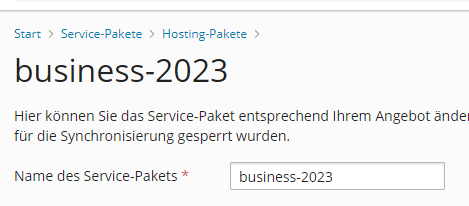
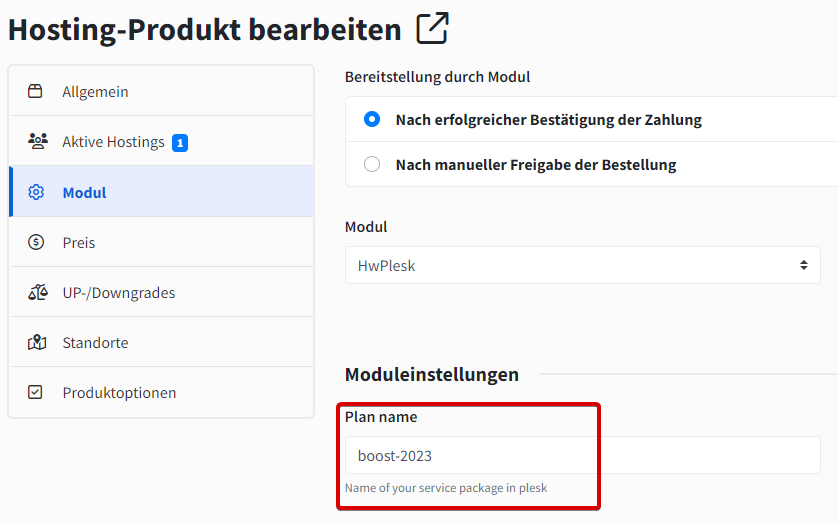
The link in the module settings for the Plesk plan is incorrect. Make sure to create a package in Plesk under the "Service Packages" tab and enter the name of the package in the product settings in hostware (Hosting -> Products -> Module).

Mit dem Plesk Modul können Sie Ihren Kunden Webhosting anbieten. Plesk verwaltet dabei FTP, Datenbanken, Mails und viele weitere Zugänge. Ihre Kunden können sich in hostware via SSO in Plesk direkt einloggen.
Standard-Funktionen (Erstellung, Sperrung, Entsperrung, Löschung, Import)
Anzeige des Speicherplatz-Verbrauches
SSO-Login in Plesk
The link in the module settings for the Plesk plan is incorrect. Make sure to create a package in Plesk under the "Service Packages" tab and enter the name of the package in the product settings in hostware (Hosting -> Products -> Module).
This happens for customers imported from Plesk: the import links the hosting to the webspace but never creates a host account, so Hosts > Accounts stays empty, SSO login resolves the wrong value, and ordering another product for that customer fails. Run the backfill command once after the import to create the missing host accounts.
Preview what the command would do (asks nothing, writes nothing): php artisan hwplesk:backfillPleskHostAccounts --dry
Run it for real: php artisan hwplesk:backfillPleskHostAccounts
For every affected hosting the command prints the customer and the resolved Plesk login, then asks for that account's password (input is hidden). It verifies the password against Plesk before saving; if Plesk rejects it, the error is shown and it asks again. Leaving the input empty skips the password for that account, which is safe: the account still appears under Hosts > Accounts and ordering works. The command is not scheduled, because it prompts for input.