
Manual usage billing
Manual usage billing allows you to bill usage-based products even when no module provides usage data automatically.
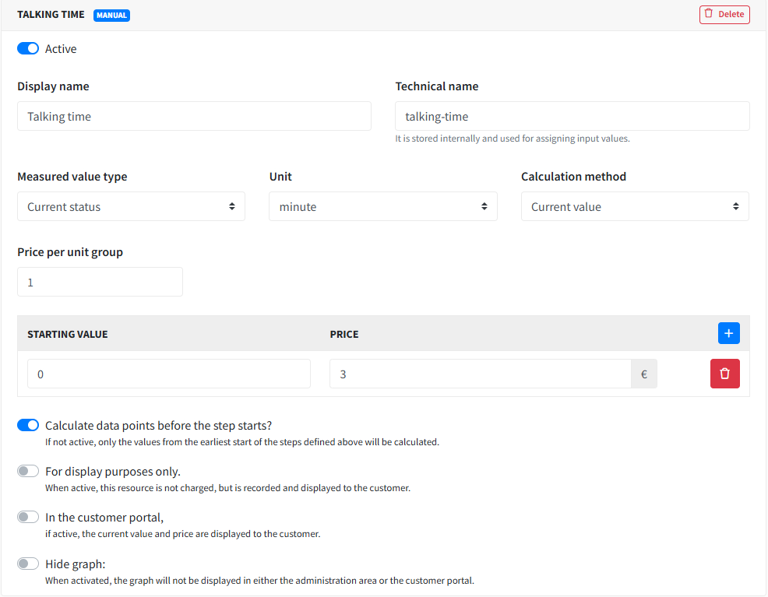
Example: You sell telephone services as a manual product (without a module), billed monthly.
Before invoicing, you enter each customer’s used minutes manually.
To configure this:
Open the product in the admin area.
Click Add manual position.
Fill in the usage billing settings (name, unit, pricing, etc.).
Save the product.
When the service reaches its billing date, the invoice is not created if manual usage values are still missing. The service appears under Accounting > Manual usage values.
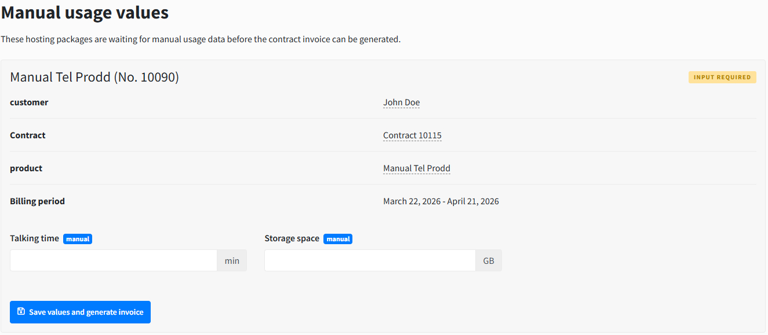
Enter the required values and save.
After saving, invoice creation is triggered and the invoice is generated with those manual usage values.
The usage billing settings also include an optional unit name field (Einheitenbezeichnung, up to 64 characters). Use it when the built-in unit does not match what you bill, for example "Minutes". The name is shown on invoices, on the shop product page, in the customer area and in the admin views. Without it, the built-in unit is used, and units without a short form (like "Element") show their full name on invoices. If you change the name later, existing hostings pick it up automatically; each hosting keeps its own pricing.