
Qonto direct debit
Qonto direct debit lets you offer SEPA direct debit as a payment method through your Qonto account. After connecting Qonto and registering webhooks, Hostware can automatically collect payments from your customers' bank accounts.
Register your app in Qonto
Before connecting Qonto in Hostware, you need to register an app in the Qonto developer portal.
Log in to developers.qonto.com with your Qonto account.
On the top right, make sure Production is selected.
Go to Settings and create a new app.
Add a redirection URL:
https://YOURDOMAIN.COM/admin/modules/hw-qonto/callbackClick Edit scopes and select the following scopes:
offline_access
client.read
client.write
organization.read
sepa_direct_debit.read
sepa_direct_debit.write
webhook
Save your changes and copy the client ID and client secret.
If the app is not registered correctly in the Qonto developer portal, the Qonto verbinden button will show a generic error like "did not work, return to the page."
Connect Qonto in Hostware
After registering your app, connect Qonto to Hostware.
Open Modules in your Hostware admin panel and locate HwQonto.
Click Einstellungen to open the module configuration.
Enter your client ID and client secret from the Qonto developer portal.
Click Qonto verbinden to start the OAuth authorization.
Log in to Qonto and authorize the connection.
After authorization, you'll be redirected back to Hostware with a confirmation message: Qonto-Verbindung wurde erfolgreich hergestellt.
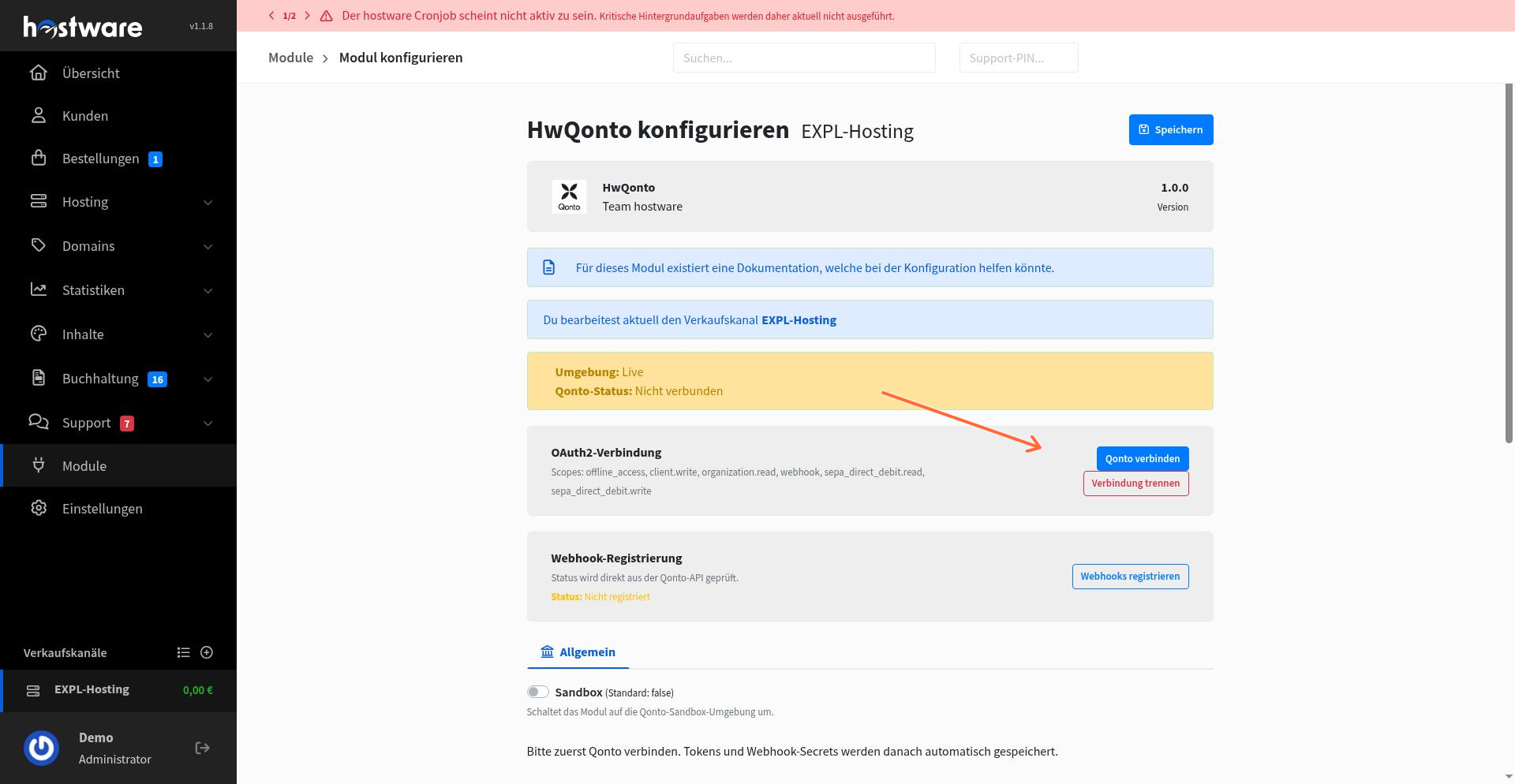
The connection stores your organization ID and access tokens automatically. You can disconnect at any time by clicking Verbindung trennen.
Register webhooks
Webhooks allow Qonto to notify Hostware about SEPA direct debit events, such as successful collections or mandate changes.
In the HwQonto module configuration, click Webhooks registrieren.
Hostware creates the webhook endpoint in Qonto and stores the webhook secret.
The confirmation message appears: Qonto-Webhooks wurden registriert.
The webhook status in the module shows whether registration was successful:
Korrekt registriert: Webhook is active and working.
Nicht vorhanden oder falsch: The webhook does not exist or the secret doesn't match. Register again.
API-Prüfung fehlgeschlagen: Hostware couldn't verify the webhook via the Qonto API. Check your connection and retry.
Disconnect Qonto
To remove the Qonto connection, click Verbindung trennen in the module configuration. This clears stored tokens, organization data, and webhook information. You can reconnect later by authorizing again.
What's next
After connecting Qonto and registering webhooks, your customers can select SEPA direct debit during checkout. If you have existing mandates from another payment provider, see Migrate mandates to Qonto to move them to your Qonto setup.
For another SEPA direct debit option, see GoCardless.