
WebsiteDashboardFeedback Board
DocumentationDeveloper Documentation
Getting started
Installation First steps
Migration zu hostware
Customer portal
Login und Registrierung
Customers
Customers
Customer groups DSGVO / GDPR
Hosting
Active hostings
Hosts
Products
Domains
Introduction Getting started Settings Domain Sync
DNS Templates
Nameserver Sets
TLD pricing
DNSSEC
Troubleshooting & Questions
Contents
Introduction
Newsletter
Letter sending
Announcements
Website & CMS
Modules
Introduction
Hosting / Provisioning
Payments
GoCardless Mollie Pay by invoice PayPal SEPA Lastschrift Stripe Qonto direct debit
Domains
SSL
Invoicing
Other
Billing
Orders
Invoices
Payments
Promotions Affiliate
Services / Contracts
Countries and taxes View and use the OSS billing report
Support
Tickets
Knowledge bases
Troubleshooting & Questions
Support setup
System & Configuration
Settings
hostware Update
Sales channels
Filtering
Troubleshooting & Questions
Currencies
Statistics
Troubleshooting
Hostings Customers
Billing
System
Global Configuration
Getting Started with Product Setup
Payments

Mollie

Introduction

Enjoy access to dozens of payment methods in a single dashboard. We are pleased to recommend Mollie to our customers.

Installation

Find your API key in the Mollie Dashboard under More -> Developers and enter it in the module configuration.
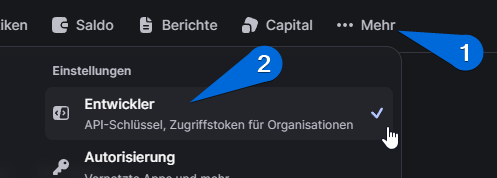
Now activate the desired payment methods in the module settings as well.

Was this helpful?
On this page
  • Introduction
  • Installation
Was this helpful?