
WebsiteDashboardFeedback Board Contact us
DocumentationDeveloper Documentation
Getting started
InstallationFirst steps
Migration zu hostware
Customer portal
Login und Registrierung
Customers
Customers
Customer groupsDSGVO / GDPR
Hosting
Active hostings
Hosts
Products
IP Adress management
Domains
IntroductionGetting startedSettingsDomain Sync
DNS Templates
Nameserver Sets
TLD pricing
DNSSEC
Troubleshooting & Questions
Contents
Introduction
Newsletter
Letter sending
Announcements
Modules
Introduction
Hosting / Provisioning
Payments
Domains
CPS-DatensystemeDomain-BestellsystemDynDNSInternetX / AutoDNSINWXLUMASERVOpenProviderOpus DNSRealtime RegisterResellerInterface
SSL
Invoicing
Other
Billing
Orders
Invoices
Payments
PromotionsAffiliate
Services / Contracts
Countries and taxes
Support
Tickets
Knowledge base
Troubleshooting & Questions
System & Configuration
Settings
hostware Update
Sales channels
Filtering
Troubleshooting & Questions
Troubleshooting
HostingsCustomers
Billing
System
Domains

DynDNS

When the DynDNS feature is enabled at the settings, the customer will be shown the DynDNS page at domain view.
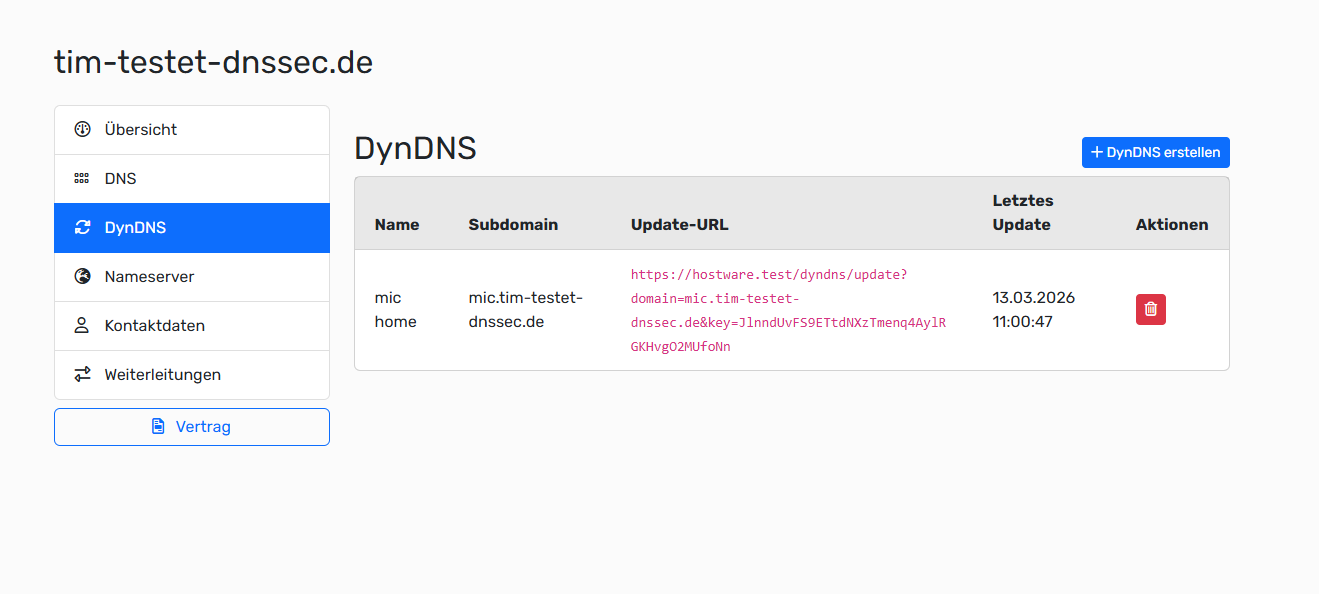
A DynDNS connection defines a hostname (subdomain) plus key/update URL. The router calls that URL to update the hostname’s DNS records automatically:

  • A for IPv4 (ip)

  • AAAA for IPv6 (ip6)

So the connection is not the DNS record itself, but the mapping/update config that manages those records.

Was this helpful?
Was this helpful?