
Backups
Implement
Add the ServerHostingBackupTrait to your Page and Action class:
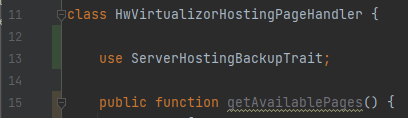
Page handler
The following function in the page handler should return the parsed data of your backups. The function returns a ServerHostingBackupResponse(), which has...
Array of backupItems
(optional) Boolean if the user can create backups, and the backup limit.
(optional) Boolean if the integration supports custom names for backups
(optional) Integer of max allowed backups. (-1 if unlimited)
(optional) If the restore percentage is not specificly given for a single backup (explained below), but rather for the entire product, pass it here.
The backupItems are an array of ServerHostingBackupItem() which has...
ID of the backup (this will be used to restore & delete backups)
Carbon() date of creation
(optional) Display name
(optional) Boolean if the backup is available for restore
(optional) The size of the backup. You can return an integer in bytes or a string, which will be just printed out.
(optional) If the backup is currently in creation, the percentage of the creation as integer from 1 to 100
public function _getBackups(ProductHosting $productHosting, string $page, Request $request) {
   // Get the backups from the remote API (in this case Virtualizor)
   $backups = $productHosting->module->getHostingHandler($productHosting->sales_channel_id)->getEnduserClient()->list_backup($productHosting->custom_fields['vpsId']);


   $backupItems = [];
   foreach ($backups['backups_list'] as $backup) {
      $display = substr($backup, 6, 2) . "." . substr($backup, 4, 2) . "." . substr($backup, 0, 4);

      // For each backup, create a new ServerHostingBackupItem() class
      $backupItems[] = new ServerHostingBackupItem(
         $backup,                 // <-- Backup ID
         Carbon::parse($display), // <-- The carbon time when the backup was created
         "Backup display name",   // <-- The display name
         true,                    // <-- If the backup is currently available for restore / deletion
         460000000,               // <-- The size in bytes OR the size as string, if available
         57                       // <-- The percentage of backup creation, if available
      );
   }

   return new ServerHostingBackupResponse(
      $backupItems,                   // <-- The backup items
      true,                           // <-- If the user can create backups, usually true
      (int)$backups['backup_limit']  // <-- The limit of backups. -1 if unlimited
   );
}
hostware will use this data to display the backup table. Depending on what data you have given, it will create table columns for date, name and size. If none of that are given, the ID will be displayed as last consequence.
Action handler
Integrate the following functions which create and restore the backup. They can either return a boolean if successfull (then a hostware-default backup message will be printed), an Exception for a custom error message or a ServerHostingProductActionResponse() if needed.
To minimize code lines and maximize the standardization of hostware, booleans should be used most of the time unless custom messages should be returned. Technical error messages should never be returned to the user, but rather logged using the LogService.
public function _createBackup(ProductHosting $productHosting, Request $request) {
   $response = $productHosting->module->getHostingHandler($productHosting->sales_channel_id)->getEnduserClient()->backup($productHosting->custom_fields['vpsId'], ['cbackup' => 1]);

   return !is_string($response);
}

public function _restoreBackup(ProductHosting $productHosting, Request $request) {
   $post['bid'] = $request->get('backupId');
   $post['restore'] = 1;

   $response = $productHosting->module->getHostingHandler($productHosting->sales_channel_id)->getEnduserClient()->restore_backup($post, $productHosting->custom_fields['vpsId']);

   return !is_string($response);
}