
Extending a template file
hostware uses the Twig template engine under the hood. That makes overriding any storefront template a matter of dropping a file at the matching path in your theme or module, and re-declaring only the blocks you want to change.
Get familiar
First, get familiar with the core template files of the hostware storefront. Take a look in the directory /resources/views/storefront. You will see all of the base twig templates.
The directory layout is extremely important and should be considered any time. You will need the path structure whenever you want to extend anything.
Extending process
What do you want to change?
Figure out the template you want to change. Do you really need to change the html layout to adjust the theme to the design? Maybe you can accomplish the goal with just CSS.
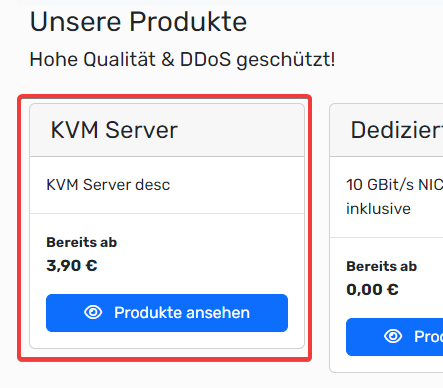
Lets say you want to adjust following product card which is likely capsulated in a separate component.
Find the template
You can find this specific card in /storefront/components/product/card.twig.
If you have trouble finding a twig template, try finding a unique html attribute (like a class) in the rendered page and search for that in the project directory.
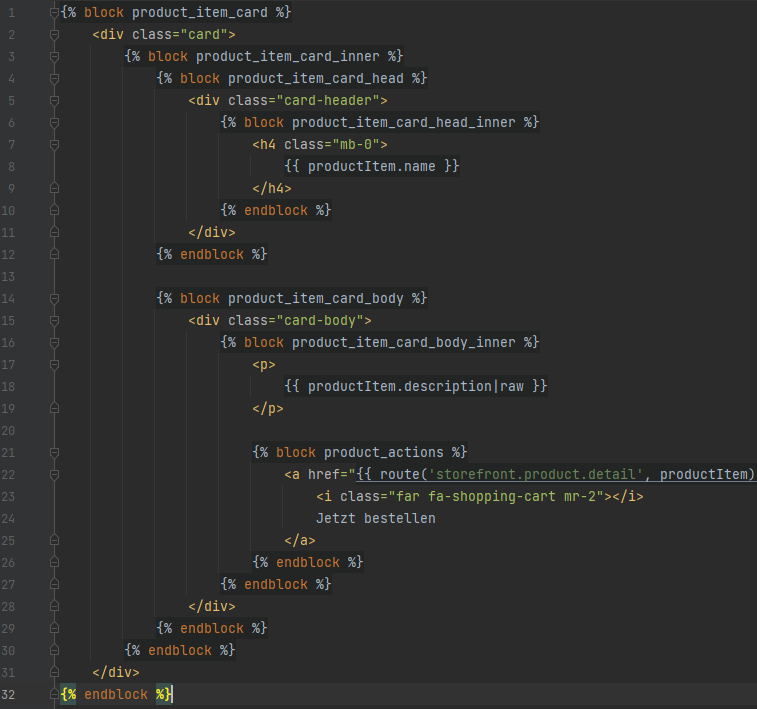
In this case the template file looks like this. As you can see, at every strategic point is a {% block %} wrapper around the HTML. This process ensures that you can change as minimal as possible.
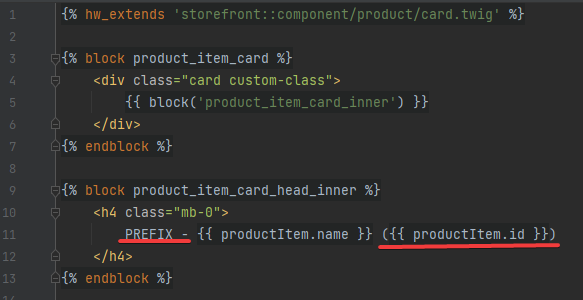
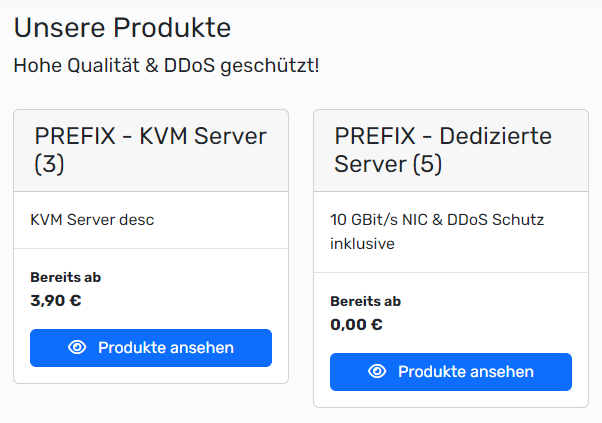
The goal for this example is to a) add another class to the .card class and b) add a prefix to the card title.
Create your overwrite template
To overwrite this template, you have to create a template name with the same name and path structure in your theme / module directory.
For this example, create following template: custom\themes\hw\hostx\resources\views\storefront\component\product\card.twig
Remember to adjust the theme / module path!
The first line in your custom card.twig file should contain the path to the file you want to overwrite. In this case, we have to prepend the storefront:: namespace because we want to change a core template. This tells the hostware framework in which order the templates should be rendered.
{% hw_extends 'storefront::component/product/card.twig' %}Overwrite single blocks
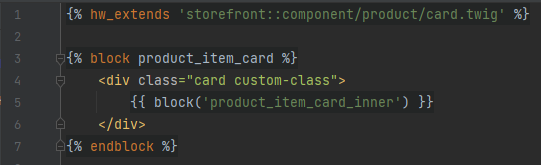
In our example, we want to overwrite the part with class="card" to add our additional class. We need to find a {% block %} in the original template file which is before the thing we want to change. In this example the block product_item_card is perfect for us.

Lets just write following code to overwrite the whole product card for now:
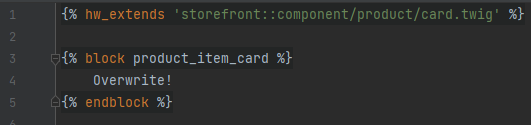
The new content "Overwrite!" will now be rendered INSTEAD of the original content inside of that specific block. Insteadwe should just change what we need and then render the next child block to overwrite as less core-code as possible. This should do the trick:
We also want to change the title. Each block you want to change MUST be on the root level of your twig file. Nested blocks are not valid if you want to overwrite them. Take a look at the original file to find the best block to overwrite. In our case, the block product_item_card_head_inner seems the best.
Our overwrite file now looks like this:
Take a look
After you saved the file, you should view your changes. (If not, try clearing the cache!)
Nested blocks
Overriding a block replaces every child block inside it too, unless you re-invoke them. Take an outer block product_item_card_head that contains an inner block product_item_card_head_inner: declaring only the outer one wipes the inner one from the output as well.
Two options to keep the original content of an inner block:
Override the innermost block instead of its parent, so the outer block's original content still renders around it. This is the "override as little as possible" pattern and is almost always what you want.
When you must override the outer block, call
{{ block('product_item_card_head_inner') }}or{{ parent() }}inside it to render the child or the original content in place.
Reusing partials with hw_include
Extending is for changing an existing template. To drop a partial inline, use hw_include. It walks the same theme -> module -> core resolution chain, so a theme that ships its own version of a partial has that version picked up wherever it is included.
{% hw_include 'storefront::component/product/card.twig' with { product: product } %}Both tags require the namespace form. A bare path without :: is rejected by the template resolver.
Troubleshooting
If your changes do not get rendered, check following:
Is your template path the same as in the core template?
Have you correctly inserted the hw_extends flag in the first line of your template?
Do you overwrite the correct block on the first level of your twig file?
Have you cleared the cache? Administration > Settings > Debug clears it from the UI, or run
php artisan twig:cleanon the CLI.
If your override renders but is missing pieces of the original template, an outer block is probably swallowing the inner ones. Re-check the Nested blocks section above.
If you have additional issues, please contact us.