
Domain Whois Service
For some domain registrar modules which done have an API to get the domain availability, hostware uses the internal WhoisService which performs whois queries via CLI and matches the response against an availability pattern.
Files
Directory: App\Framework\Core\Hosting\Domain\Whois\ WhoisService.php The logic for the whois requests. This usually must not be changed.
whois-servers.json A JSON file for each TLD with the availability pattern. This file must be changed when something is not working for a given TLD.
Pattern
The response text is always different when a domain is given, but always the same when a domain is available.
Example: "The domain is not given"
Debug a false-positive
When a domain availability status is wrong, you can debug it the following way.
Open Page
Open the domain search in the storefront.
Open Dev Tools
Open the dev tools of your browser (F12), entering the "network" tab.
Perform check
Enter the requested domain and perform the check.
Open AJAX request
Open one network request which matches your TLD. You will see the WHOIS response which you can use to check if there is an issue with the pattern or the whois server.
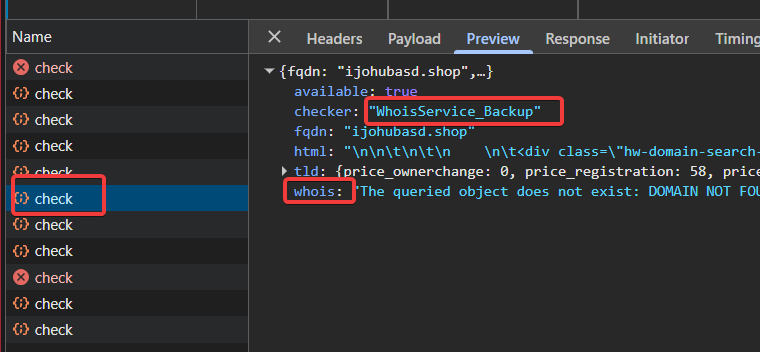
Adjust whois-servers.json
Adjust the JSON file, clear the cache, try again.