# Domain Reselling Manager
## Introduction
This module is used to unify the handling of domain resellers and their transactions in one place, and you can easily invoice your resellers transactions. This saves a lot of time as you don't have to go to the portal of your reselling provider, manually calculate transactions and create invoices for them.
{% hint style="info" %}
This module is only intented for billing purposes. The customers may have an overview of their transactions in the future, but wont manage their domains in the customer portal. They still manage their domains with the regular access to the third party portal.
{% endhint %}
### Reselling providers
Currently we have two available domain reselling providers which you can connect to, and each has different configuring options.
{% content-ref url="domain-reselling-manager/domain-bestellsystem" %}
[domain-bestellsystem](https://docs.hostware.io/modules/other/domain-reselling-manager/domain-bestellsystem)
{% endcontent-ref %}
{% content-ref url="domain-reselling-manager/autodns-internetx" %}
[autodns-internetx](https://docs.hostware.io/modules/other/domain-reselling-manager/autodns-internetx)
{% endcontent-ref %}
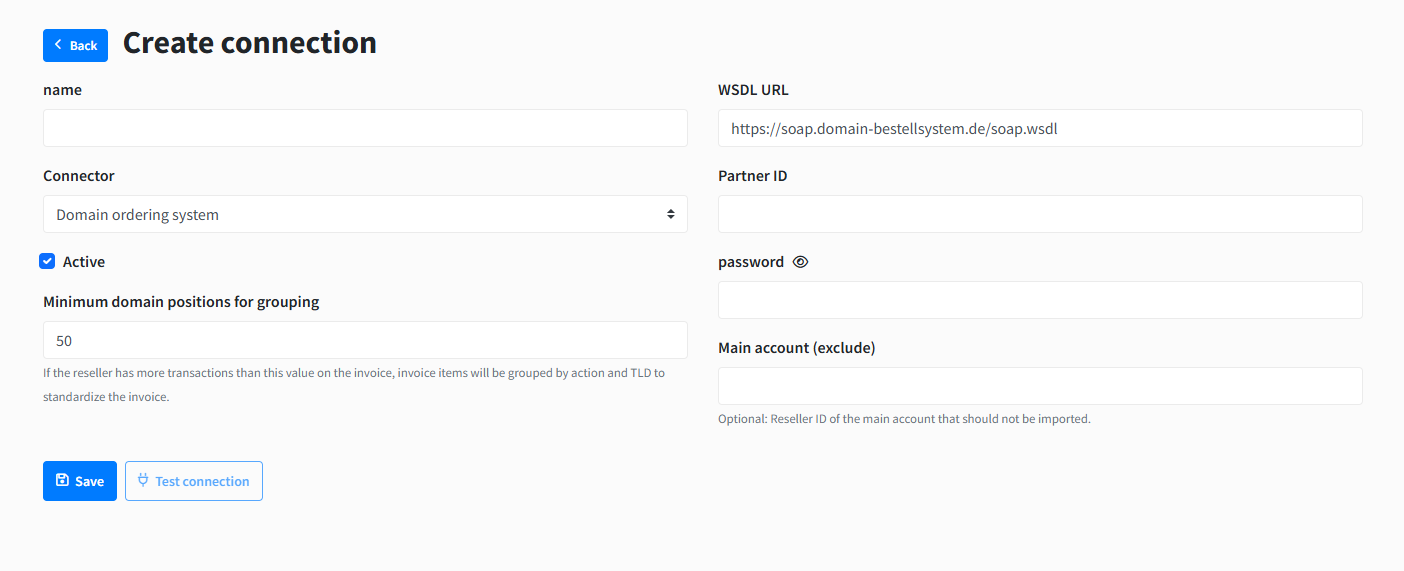
Anyway, each connection will have the configs explained below:
#### Common config fields
They all have these two optional common config fields:
* Minimum domain positions for grouping - which represents the max number of transactions the generated invoice items will contain. So if it is set to 30, the invoice item will contain the amount of up to 30 transactions, which are also included in the invoice item description. If not set, the default value is 50.
* Main account (exclude) - you can set the id of the main reseller(which is basically the main account of the admin that manages resellers) here, which will be excluded from the importing of resellers
You can create multiple connections to the available reselling provider. A connection basically means one account of yours in one reselling provider integrated in Hostware only for reading the data we need.
You can also see the "Test connection" button which you can click to test the connection to the reselling provider, after you have filled the config fields.
## Features
You can [import resllers](https://docs.hostware.io/modules/other/domain-reselling-manager/how-to-import-and-map-resellers) than you can continue to manage them.
### Reseller transactions
#### Month filter
At the Reseller edit page, under "Transactions" tab, you can view the reseller's IMPORTED transactions within the selected month.
In this page we have two tabels. The first one shows statistics grouped the action of transaction and by transaction Domain TLD, taken from the imported transactions.
Like for example, from the above image, you can see that the "at" TLD has been renewed 9 times, in a total sum of 81€.
The second table shows a list of the imported transactions:
Where we show some important transaction details as seen above.
Now here at this page which we can say is the most important one of this module, except for listing transactions and showing transactions summary by action and TLDs, we can also do some important actions like:
* [Importing transactions in the selected month](#import-transactions)
* [Manually creating invoice](#manually-create-invoice)
#### Manually import transactions
You can import the reseller's transactions for a certain month, by [selecting the month](#month-filter) in the filter as above and clicking the "Import Transactions" button next to the month filter:
This will trigger a process which will import the transactions within the selected month, that have not been imported yet from the reselling provider. It finds the ones that have not been imported and stores them in the DB. At the end of the process we get a message giving stats about the import:
In this case, it found 108 new unimported transactions for February, and 53 were already imported earlier.
{% hint style="info" %}
Keep in mind that transactions are imported every hour in the background
{% endhint %}
so you will not have to manually import them often, except for maybe when you want to [manually create an invoice](#manually-create-invoice) for the transactions in a month that has not ended yet, and want to make sure you have imported all transactions from the reseller provider.
After you import transactions for a reseller, you can [create invoices](https://docs.hostware.io/modules/other/domain-reselling-manager/how-are-invoices-created) for those transactions
#### Reseller invoices
At the reseller edit page, under the invoices tab, you can view the list of all the invoices created for that reseller, both manually and automatically.
## Installation
This module itself does not need any configuration, but its integrations do. You just install and enable the Domain Reselling Manager, then you can find it at *`Domains > Domain Reselling`.*
## Troubleshooting
Question
Answer